 Gustav
What you are looking at
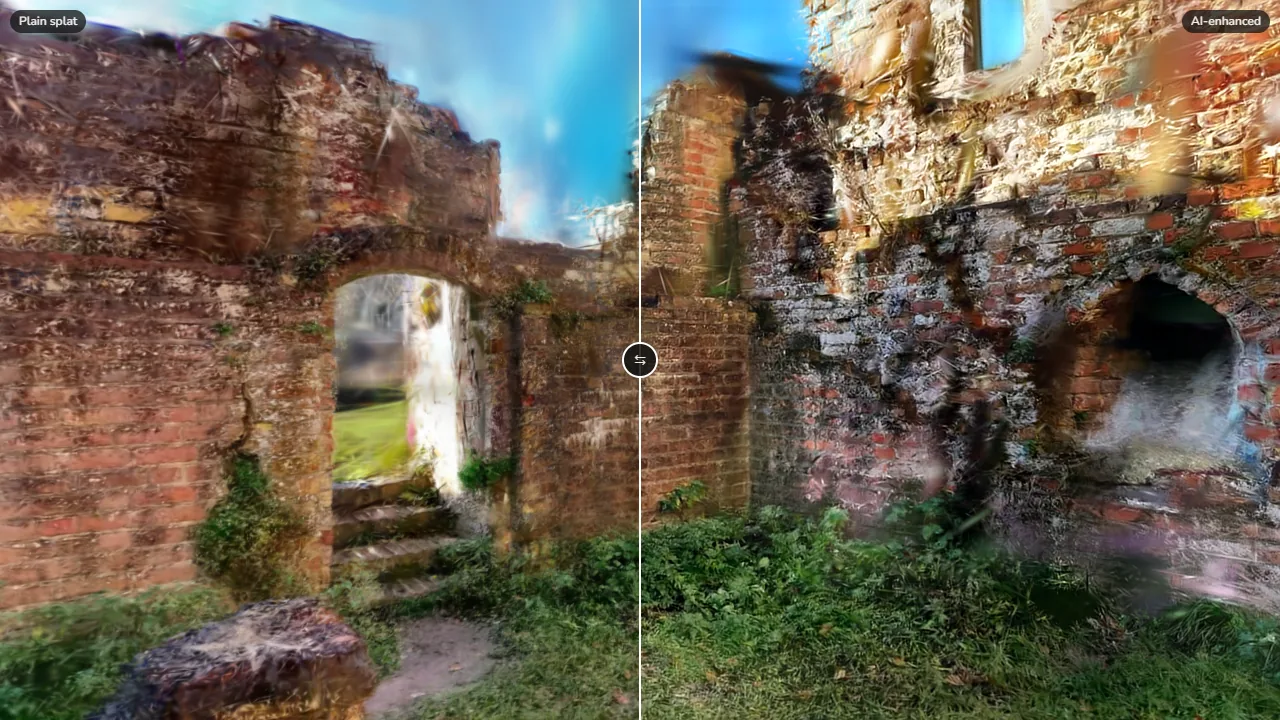
I filmed a ruin on my phone, turned the video into a Gaussian splat and built a walk through it. That part is the same recipe as my Eremitageslottet walk.
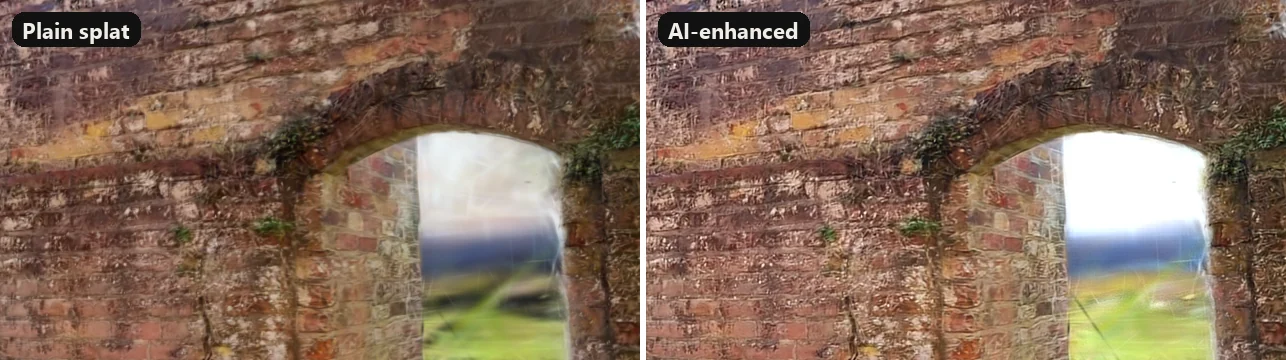
The new part is the right half of the picture. A small neural network looks at what the splat renderer draws, on every frame, and pushes it towards what the real camera saw: crisper mortar lines, stronger contrast, colours closer to the footage.
The short version
- SourceOne phone video, 720 frames. RealityScan worked out the camera position of every frame, and 717 of them were usable
- The splatTrained in Brush on a GeForce GTX 1070 from 2016, 60,000 steps and 2 million splats, trimmed to 1.2 million (38 MB) for the web
- Training pairs609 pairs. The splat rendered in a browser from each camera, matched to the real video frame from that camera
- The networkA UNet with 254,000 parameters. The finished file is 1 MB
- ScoreOn 60 held-out frames: 21.6 dB against 19.5 dB for the plain render. Higher means closer to the real photo
- SpeedAbout 22 ms per frame in the browser, around 45 fps at 1280 by 720, on the same GTX 1070
The idea: every video frame is an answer key
A splat is trained to match its photos, but it never matches them perfectly, and the web viewer adds its own softness on top with the way it sorts and blends the splats. The gap between what the viewer draws and what the camera saw is a pattern. A network can learn a pattern.
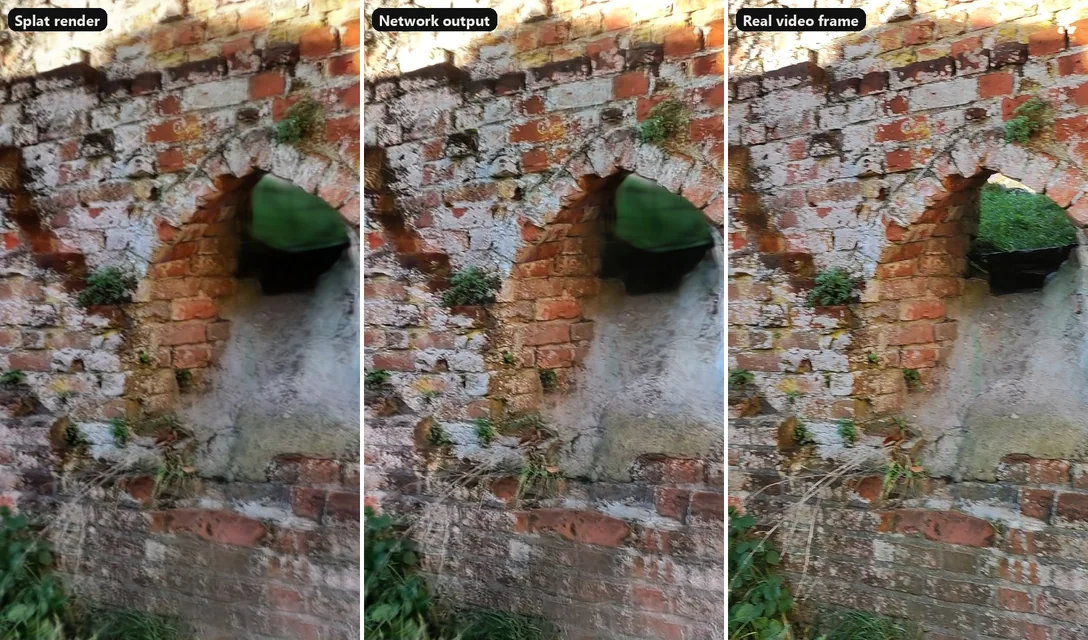
And I already have both sides of every example, because I know where the camera was for every frame. Render the splat from that exact position and you have the input. The real frame is the target.
Step 1: render the splat the way the browser does
I rendered all 717 views in a headless browser using the same viewer code that runs on this page. That matters. The network should learn the look of the web viewer, not the look of the trainer's own preview.
Step 2: line the pairs up
If the input and the target are off by a few pixels, the network learns to blur. So I measured the leftover shift between every render and its real frame with phase correlation. The median was 0.08 pixels and 95% were under 0.3. The camera alignment from RealityScan was that good.
Then I threw away the frames that make a bad answer key: the ones with the most motion blur, and any pair where the match looked unreliable. That left 609 pairs. Every tenth frame was held back for testing and never trained on.
Step 3: train on patches
609 whole frames is not much, and they are big. So the network trains on random 256 by 256 patches, flipped and rotated, which gives it thousands of different crops to learn from.
It predicts a correction that is added on top of the render. It can nudge the picture, never redraw it. The loss is the pixel difference on a slightly blurred copy, which forgives the last bit of misalignment, plus a structure term that rewards sharp edges and contrast.
Step 4: make it fast enough for a web page
My first network had 1.5 million parameters and scored 21.6 dB. It ran at about 5 frames per second on my GTX 1070 at this resolution, which is no good for walking around. Two changes fixed that.
- A lighter network. Most of its layers work on a picture four times smaller, and the fine detail is added back at the end. That is nine times fewer operations. After 30,000 steps it scored 21.55 dB, practically level with the big one.
- No trips through the CPU. The usual way to run a network on a canvas reads the pixels back into JavaScript, converts them and uploads them again. That cost more than the network itself. Now the canvas goes straight into a GPU texture, through the network (ONNX Runtime Web on WebGPU) and onto the screen without leaving the graphics card. On its own this took the big network from 5.5 to 9.5 frames per second.
Together that is about 45 frames per second, measured while another training run was still using the same card.
What is not perfect
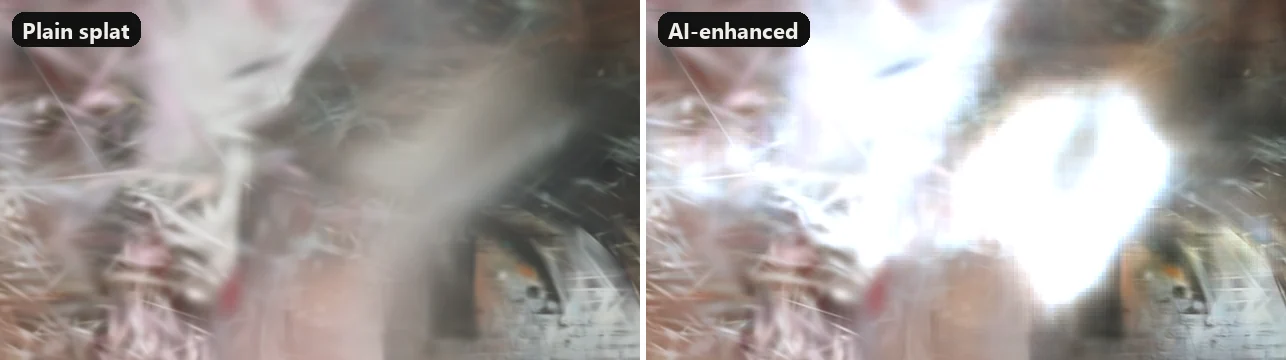
- It cannot fix missing data. In places the video barely saw, the splat is smeared and the network has little to work with. That is where it can hallucinate, like the white blob above.
- It only knows this ruin. It learned the colours and textures of these walls. On another scene it needs its own training, about an hour on the same card.
- The test score is flattering. The held-out frames are every tenth frame of the same walk, so they sit between training frames. That shows the network is not memorising single images. It does not show how it behaves far from where I walked.
- It needs WebGPU. Chrome or Edge on a desktop. Without it you see the plain splat. It is also 38 MB plus 1 MB to download.
- Fast movement lags. The enhanced picture trails the plain one by about a frame, so quick turns can look slightly off.
The gain is about two decibels, a clear but moderate improvement. It makes a splat look more like a photo, it does not make a splat into a photo.
Why this matters
Any splat built from photos or video with known cameras gives you this paired dataset for free. That makes a cheap finishing step: a tiny network, trained per scene in about an hour, shipped as a 1 MB file next to the 3D scene.
I tried the sharpening version of this idea on an orc in a tiny neural network that sharpens a splat in real time, trained on a handful of reference images. This one learns the look from a whole walk of real footage, and for a space like this it is the more natural fit. For a shop, a property or a heritage site it means the 3D can look closer to the real thing without a heavier splat. That is the kind of 3D visualization work I find most interesting right now.
Frequently asked questions
What does the neural network do to the splat?
It looks at what the splat renderer draws, on every frame, and adds a correction that moves the picture towards what the real camera saw. In practice that means crisper mortar lines, stronger contrast and colours closer to the original footage. It is a correction on top of the render, so it can only nudge the picture, not redraw it.
Do I need a special browser?
The AI layer needs WebGPU, which today means Chrome or Edge on a desktop computer with a reasonably recent graphics card. Without WebGPU the page still works and shows the plain splat. I have only tested it on a desktop with a GeForce GTX 1070 from 2016, not on phones.
Could this work on my own scene?
Yes, if the scene was captured with known camera positions, for example from a photo set or video that has been through RealityScan or similar. Those cameras give you a paired dataset for free: the splat rendered from each camera, and the real photo from that camera. The network has to be trained per scene, which took about an hour on a GTX 1070 here.
Why not a GAN or a diffusion model?
A GAN or diffusion model invents more dramatic detail, but it invents different detail on every frame, which shows up as flicker when the camera moves. A plain regression network is a smooth function of its input, so the picture stays calm while you walk. It is less impressive in stills and much better to look at in motion.
How big is the download?
The 3D scene is 38 MB and the neural network is 1 MB. The scene loads in a few seconds on Wi-Fi and takes longer on mobile data.