 Gustav
Last time I turned an AI-generated 3D model into a Gaussian splat, with a CycleGAN pass to push the look towards photoreal. It looked good, but any splat has a ceiling: it can only be as sharp as the images it was trained on, and by nature it is a little soft. Zoom in on the face and you see it.
My idea was simple. Take reference images that are sharp, damage them on purpose, and train a small network to repair the damage. Then run that network on every frame of the splat, live, while you move around it.
The short version
- The splat277,596 splats, 8.9 MB, trained from 300 Blender renders in Brush
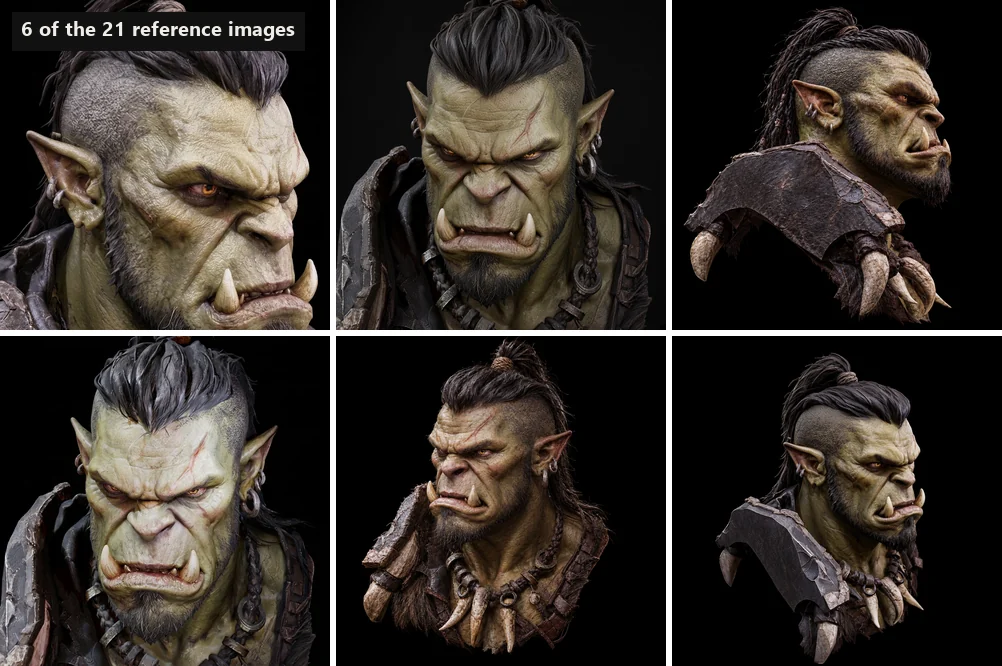
- Training data21 reference images of the character (19 for training, 2 held back to test on)
- The network6 convolution layers, 16 channels, 11,548 parameters, 2x upscaling
- Training12,000 steps, under 10 minutes on a GeForce GTX 1070
- Measured27.8 dB on unseen references, against 26.0 dB for plain upscaling
- In the browserWebGL2 shaders, 106 kB of weights, 60 fps at 1280 by 800 on the same GTX 1070
Step 1: teach a network to undo blur
Every training example is made on the fly. I cut a random patch from one of the reference images, blur it by a random amount, shrink it to half size and add a little noise. The network sees the damaged small version and has to produce the original. Because the blur strength changes every time, it learns to deal with soft input in general, not one fixed blur.
The network itself is deliberately tiny: a few 3x3 convolution layers with 16 channels, ending in a pixel-shuffle that doubles the resolution. It does not draw the picture. It adds a correction on top of a plain upscale, so it can only add detail, never wreck the image. The loss is the pixel difference plus the difference between edges, which pushes it towards crisp outlines.
I left GANs out on purpose. A GAN or a diffusion model would invent more dramatic detail, but it invents different detail on every frame, and when the camera moves that shows up as flicker. A plain regression network is a smooth function of its input, so the result stays calm while you rotate.
Step 2: watch it train
I plugged the training into the same dashboard I used for the CycleGAN runs, so I could watch the loss fall and the held-out score improve every 250 steps, and drag a slider over blurry input against result against the original.
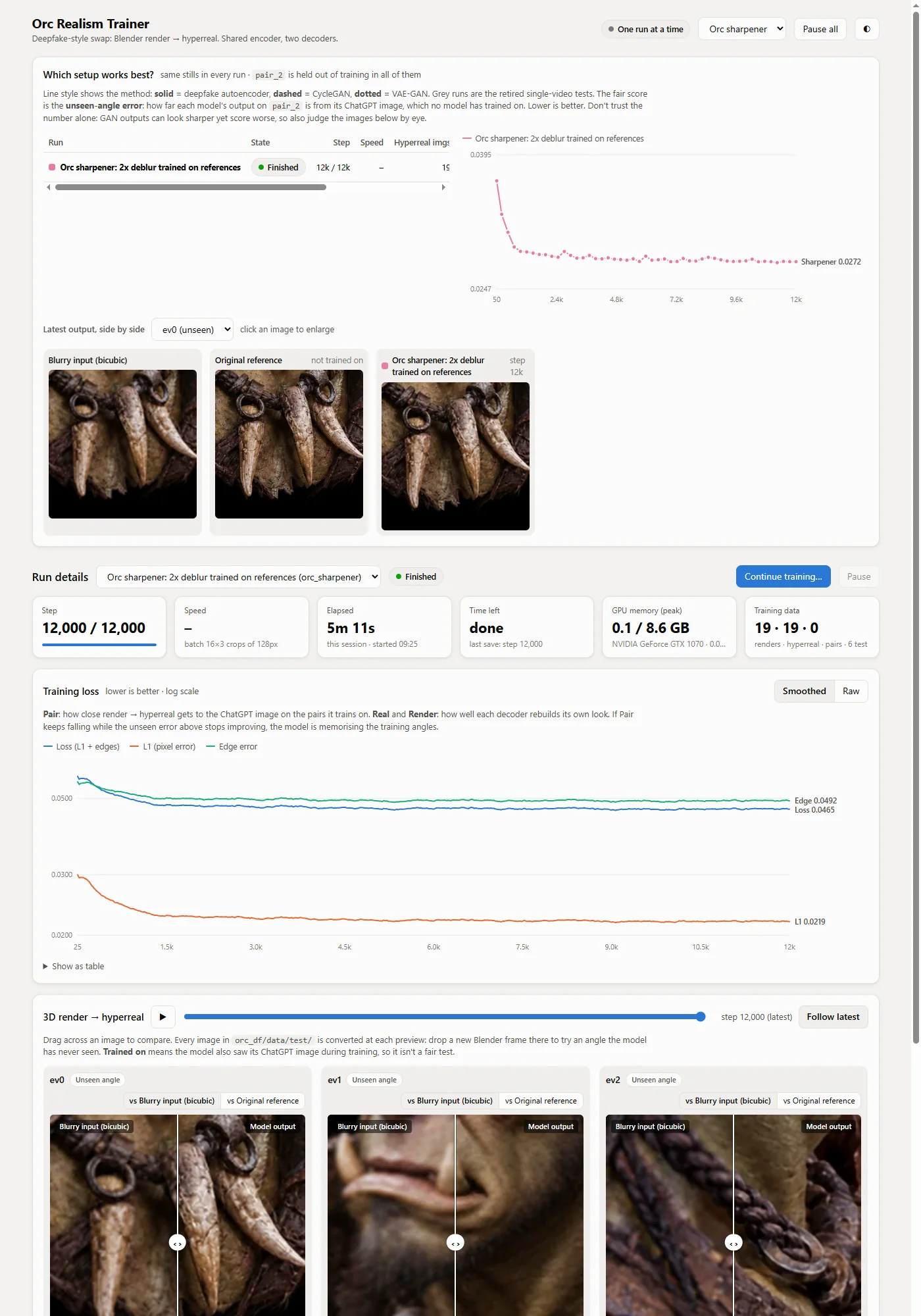
Held out, the network reaches 27.8 dB against 26.0 dB for plain upscaling. That is a clear but modest gain, and I would rather tell you than dress it up: this is sharpening, not magic.
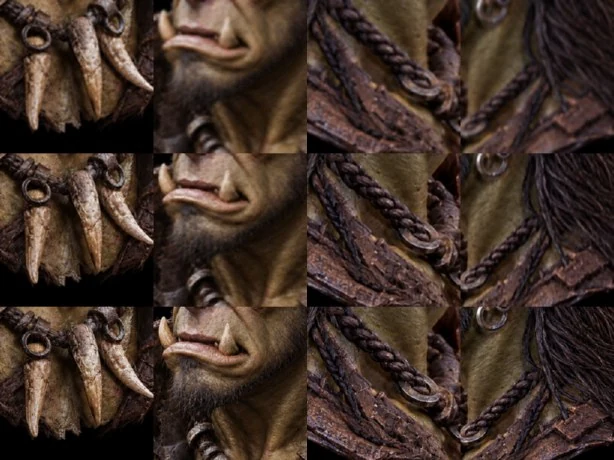
Step 3: run it in the browser, on every frame
This is the part that took the most care. The network is small, but it still has to run for every pixel, every frame, next to the splat renderer.
- Render the splat at half size. The splat is drawn into a render target with a quarter of the pixels. The splat then has a quarter of the pixels to draw, which offsets part of the network's cost.
- Write the network as shaders. Each layer is one WebGL2 draw call that reads the previous layer's output as textures and writes its own, four channels per texture, all in half-float precision. The last pass rearranges the channels into the full-resolution image and writes it straight to the screen.
- Share the GPU context. The network runs on the same context as the splat viewer, so the image never leaves the GPU. No copies, no readback.
To be sure the shaders compute exactly what PyTorch does, I compared them numerically layer by layer. The browser output matches PyTorch to within 0.001 on a 0 to 1 scale, less than one 8-bit color level. What you see in the browser is what I trained.
The bug that was hardest to spot: the first layers matched PyTorch perfectly, but the last layer came out wrong. A framebuffer slot from the previous layer was still attached while that same texture was being read as input. WebGL treats that as a feedback loop and silently skips the draw. The fix is one line: detach every unused output slot before each pass.
What it looks like
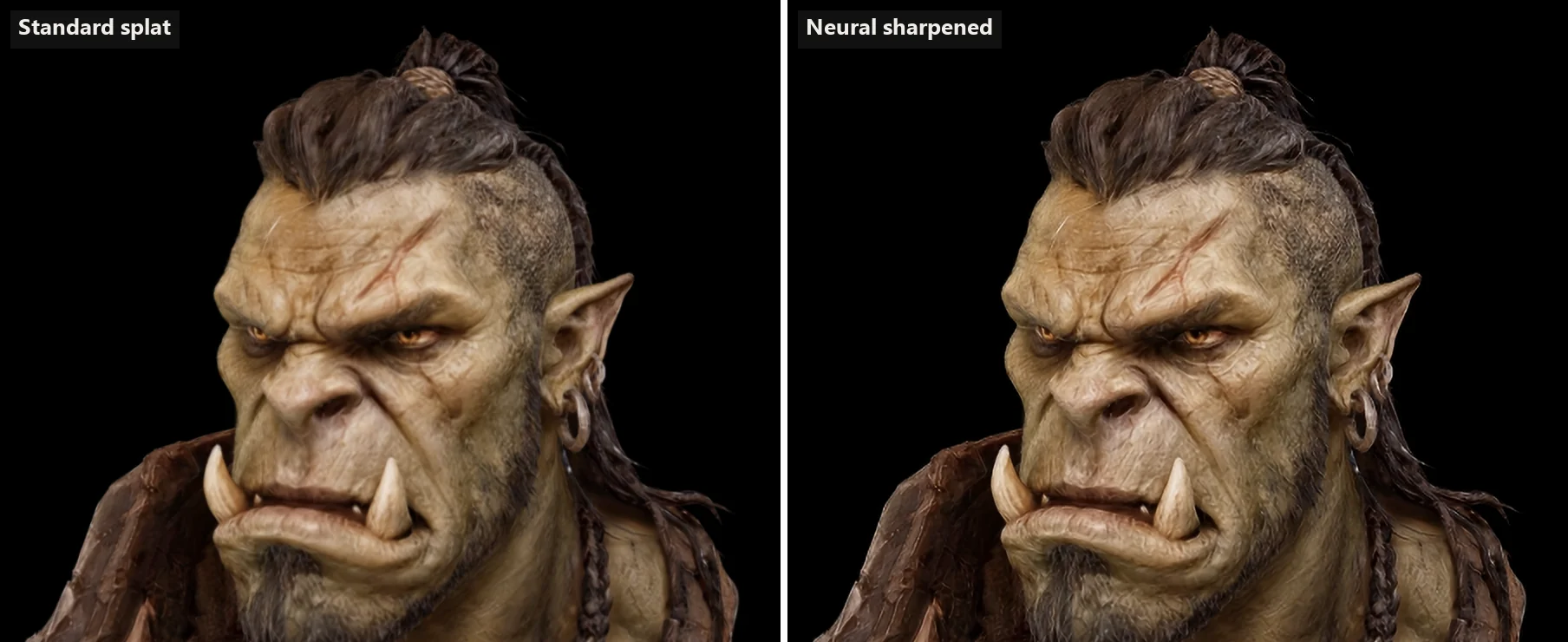
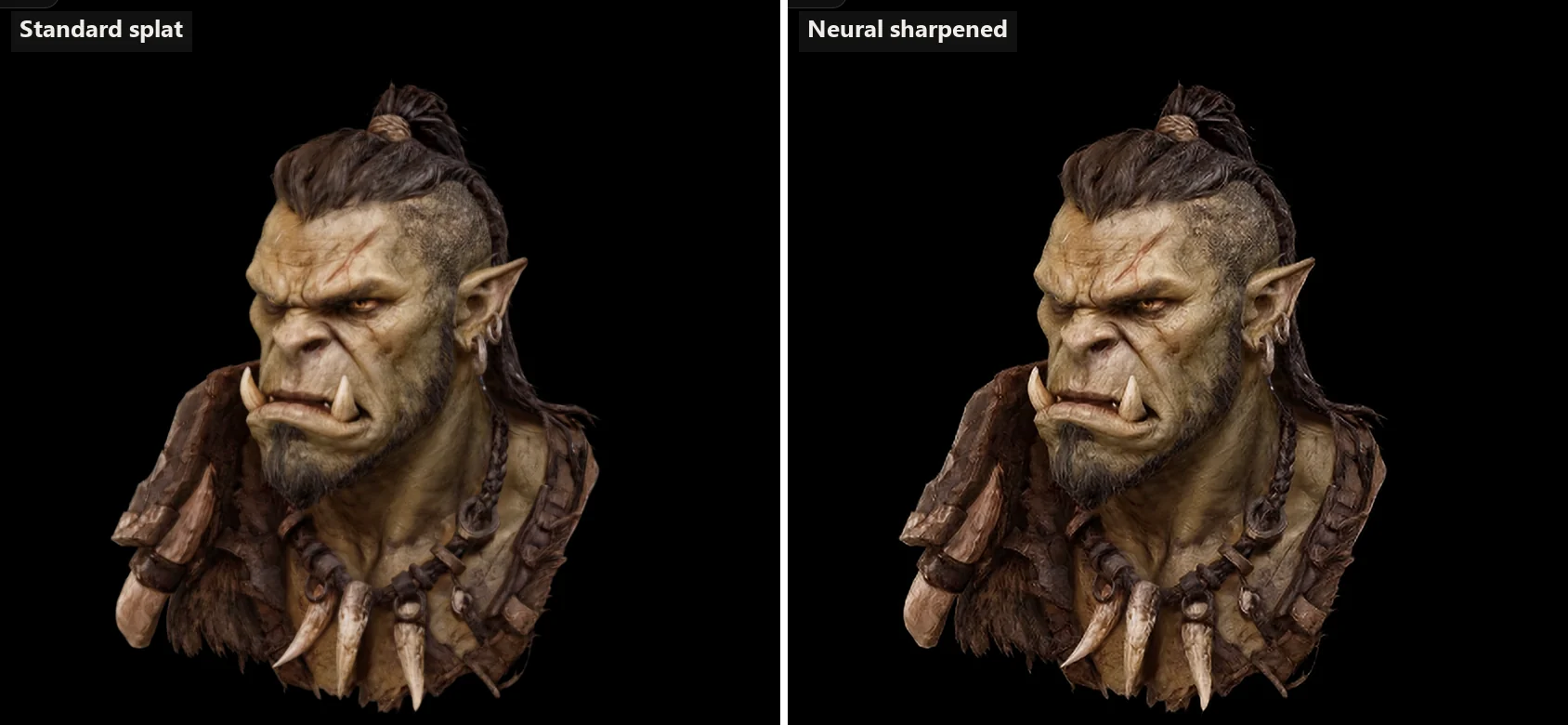
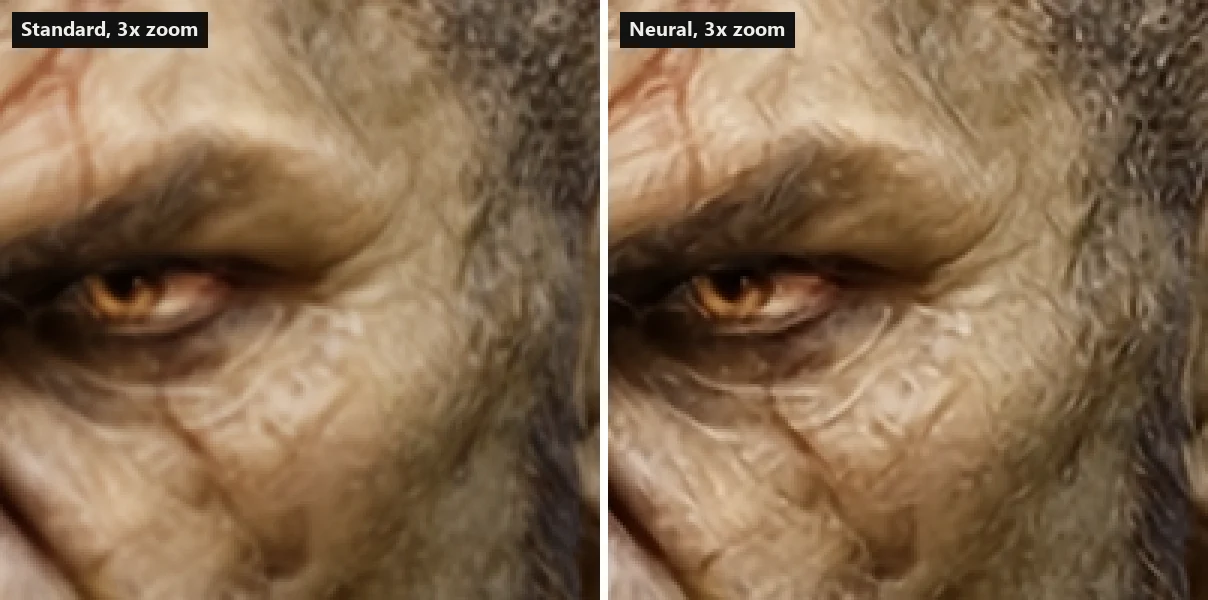
Zoom in to the actual pixels and the difference is clearer: wrinkles, eyelashes and skin texture that are mushy in the standard render come out with structure.
The honest limits
- It sharpens, it does not invent. If detail is missing from the splat entirely, the network cannot bring it back.
- Some texture looks a little crunchy at high zoom, especially on skin. The strength slider in the demo lets you turn it down.
- The blur I train against is synthetic. A splat's real blur is not an ideal Gaussian. Measuring the real blur and training against that is the next improvement.
- It needs WebGL2 and float render targets. Current desktop browsers have both; phones depend on the GPU. If a device cannot do it, the page falls back to the standard splat.
- It learned one subject. Skin, hair, leather and metal should carry over to similar models. A very different subject should get its own references and a retrain, which takes minutes.
Why this matters
Real-time 3D on the web has a quality ceiling set by download size and device speed. A splat is already light: here 8.9 MB. Adding 106 kB of network weights and half the render cost buys visible sharpness without a bigger file, and without baking anything into the splat. For product pages, configurators and campaign sites that need an object to look real, that is a useful lever, and the same idea applies to any real-time 3D view, not just splats.
It fits how I work in 3D visualization: let the 3D data control shape and consistency, and use a small, trained model where it adds detail without guessing. If you want to explore something like this for your product or scene, get in touch, or try the full-screen demo first.
Frequently asked questions
What is a neural sharpener for a Gaussian splat?
It is a small neural network that takes the image of the splat and returns a sharper version of it. Here the splat is rendered at half resolution and the network upscales it to full resolution while restoring fine detail like skin pores, wrinkles and hair, learned from a set of reference images.
Does it run in real time in the browser?
Yes. The network is written as WebGL2 fragment shaders and runs on the same GPU context that draws the splat. On a GeForce GTX 1070 from 2016 it holds 60 frames per second at 1280 by 800 pixels, which is the display's limit. Rendering the splat at half resolution offsets part of the network's cost.
Why not use a GAN or a diffusion model for the sharpening?
A GAN or diffusion model invents sharper detail, but it invents different detail every frame, which shows up as flicker when the camera moves. A plain regression network is a smooth function of its input, so the result stays stable while you rotate. It also fits in about 11,500 parameters, which is what makes real-time browser use possible.
How big is the download?
The splat file is 8.9 MB and the network weights are 106 kB. Nothing else is downloaded for the sharpening, and the splat viewer itself is a small open-source library.
Can it sharpen any splat?
The network learned general deblurring from reference images of one character, so it helps most on similar material: skin, hair, fur, leather and metal. For a very different subject you would train it on references of that subject, which takes minutes. It cannot create detail that the splat does not contain at all.