 Gustav
This started as a simple question. AI image tools can make a 3D character look like a photograph, but only one image at a time, and every image comes out a little different. 3D gives you the opposite: perfect consistency from every angle, but it rarely looks real unless you spend serious time and render power on it.
So what happens if you let the 3D model handle shape and consistency, and train a small neural network to handle the realism?
The short version
- 3D modelGenerated for free with an AI 3D tool, shown in a real-time Blender viewport
- Training dataAbout 290 realistic images: ChatGPT versions of Blender stills plus frames from two short AI-generated videos
- ModelCycleGAN with a generator of about two million parameters
- HardwareGeForce GTX 1070, 8 GB, a card from 2016
- Training47,000 steps, at roughly five steps per second
- Output1,862 video frames converted in about six minutes
Step 1: a free 3D model, good enough to work with
The starting point is an AI-generated 3D model of an orc. It cost nothing, and it is honestly not bad: decent shapes, fur, leather, metal, tusks. In a real-time Blender viewport it looks like what it is, a semi-realistic 3D asset. Plastic skin, painted-looking leather, fur that reads as cards.
That gap between "3D" and "photo" is mostly not about shape. It is micro detail, subsurface light in skin, how worn metal catches light. Exactly the kind of thing neural networks are good at learning from examples.
Step 2: a dataset of AI-rendered images
A network can only learn "realistic" if you show it what realistic looks like for this exact character. I did not have photos of an orc, so I generated them.
First I rendered a few angles from Blender and asked ChatGPT to make each one hyperrealistic while keeping the same angle. The results looked great, but they were not exact. Measured against the renders, features had moved 10 to 20 pixels and the fur had grown. For training that matters, so I warped every ChatGPT image back onto its render using optical flow, which moves the large shapes into place while keeping the new detail.
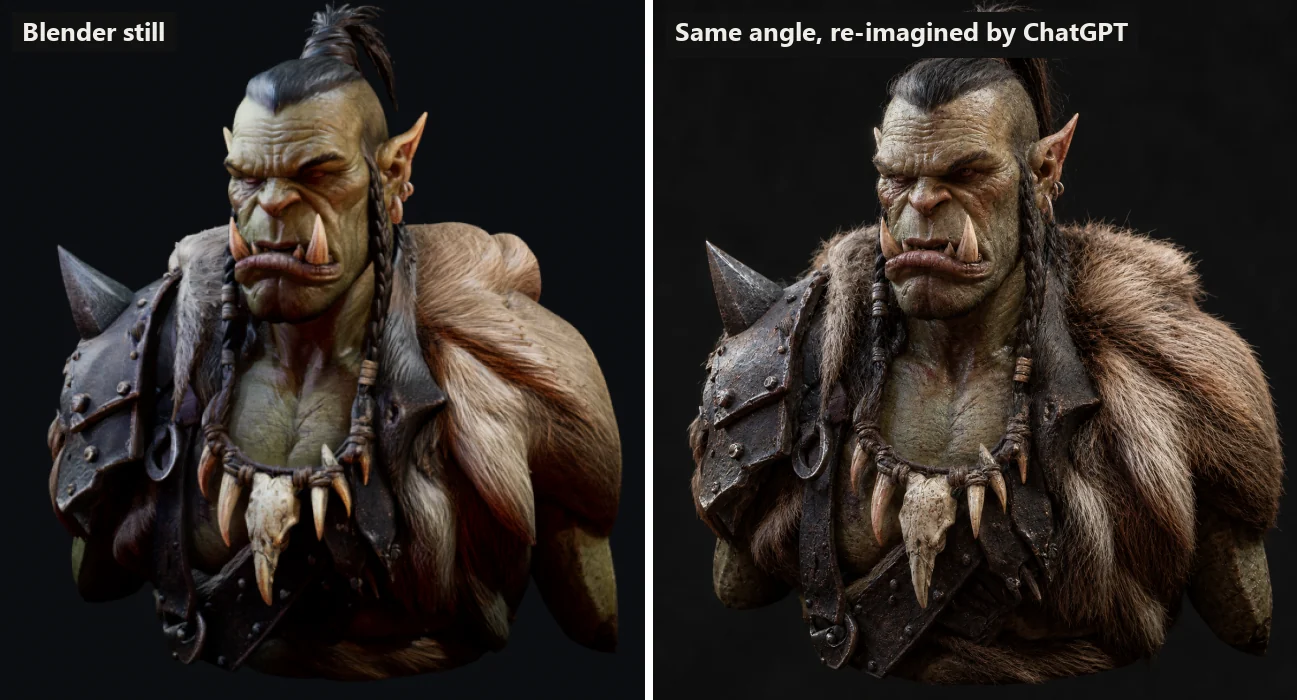
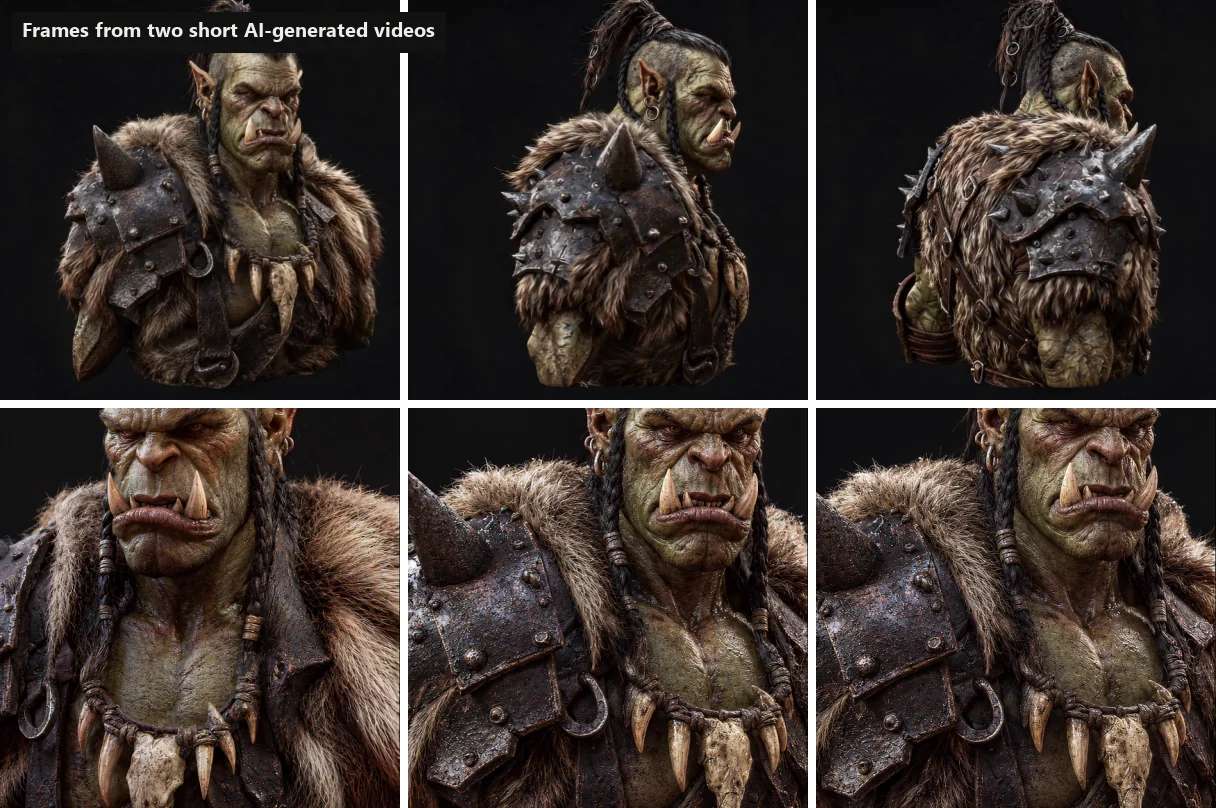
A handful of stills is not enough to learn from, so I added two short AI-generated videos of the same character, one slow turn all the way around and one close orbit around the face. Split into frames, that gave about 290 realistic images, including angles the stills never covered, like the back.
Step 3: training the network
I did not go straight to CycleGAN. I set up several approaches and trained them against each other on the same data:
- Deepfake-style autoencoders. One shared encoder and two decoders, one for the 3D look and one for the realistic look. Swap the decoder and a render comes out realistic. I also tried a wide version with a lot of latent space.
- VAE-GAN. A tight bottleneck and a training goal that rewards looking real over matching pixels.
- CycleGAN. Two generators, 3D to real and real to 3D, each judged by a critic that tries to spot fakes. A cycle check makes sure a render sent to "real" and back still matches the original, which keeps the shapes from drifting.
To compare them fairly, one camera angle with a ChatGPT version was kept out of training completely. Every model was scored on how close it got to that unseen image. I built a small dashboard to follow all the runs side by side.
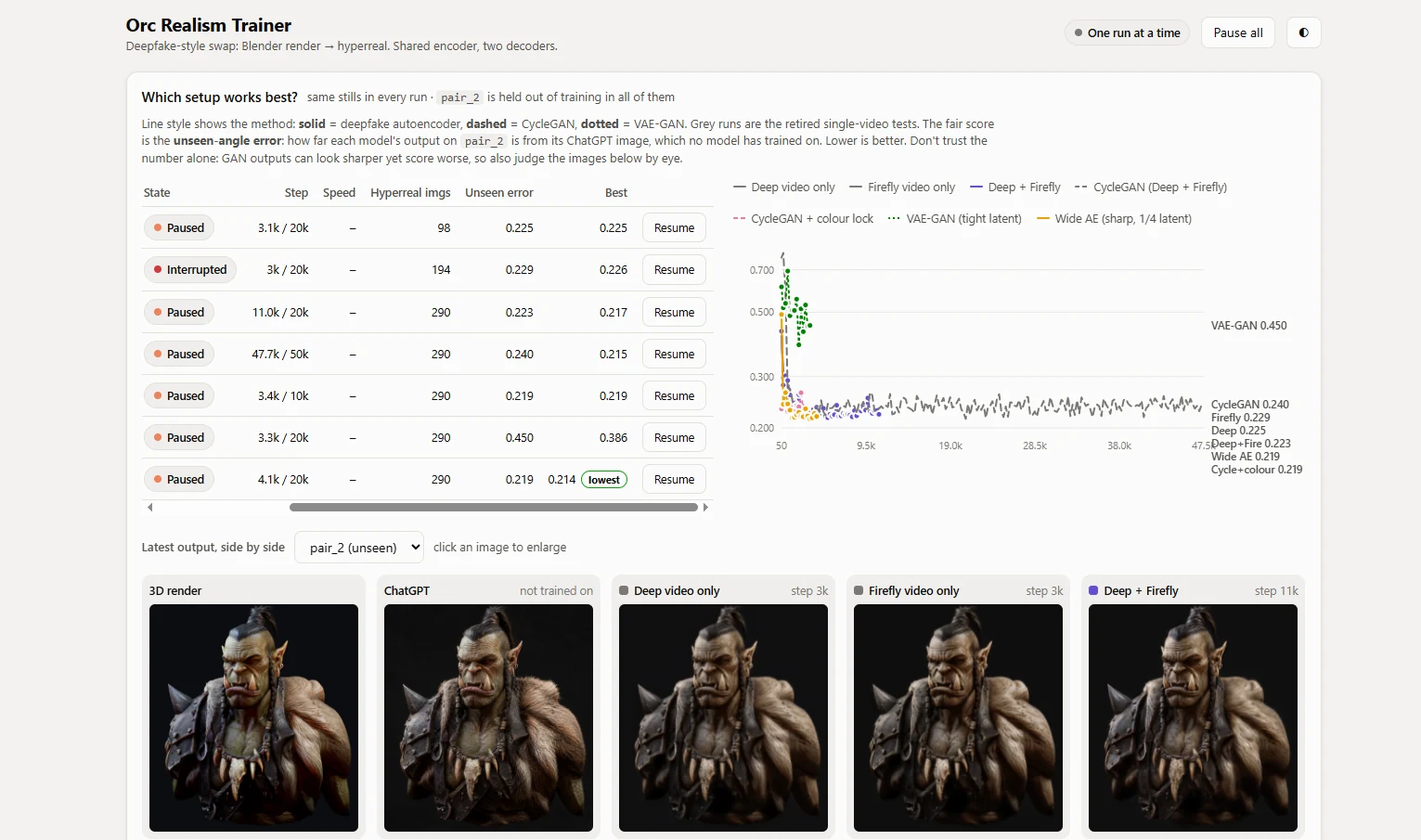
On the numbers, most runs ended up close to each other, with the VAE-GAN clearly behind. By eye, CycleGAN won clearly. The autoencoders played it safe and went soft and washed out, because blurry images score well on pixel error. CycleGAN produced actual texture: pores, worn leather, wet-looking metal, individual fur strands.
Lesson worth keeping: a pixel-based score rewards blur. For anything where realism is the goal, look at the images, not just the number.
What went wrong along the way
Plenty, and it is the useful part.
- The GAN collapsed. Around step 6,000 the first CycleGAN suddenly fell apart and only produced dark noise. Worse, the checkpoint was overwritten with the broken version. The fix was to always keep the best model separately, roll back automatically if the score suddenly gets worse, and keep the critic from overpowering the generator.
- The colours drifted brown. The network faithfully copied the slightly darker, redder palette of the AI videos, so the green skin turned brownish. A realistic look is learned from your data, including its flaws.
- I crashed my own PC. Running four trainings at once kept a ten-year-old GPU at full load for hours, and Windows eventually gave up. One run at a time, with the option to pause and switch between them, solved it.
Step 4: applying it to the video
The final step is almost boring, which is how it should be. I recorded the Blender viewport while the orc turns, cut out the camera frame from every screen frame, ran it through the trained generator and pasted it back. The interface around it stays exactly as recorded.
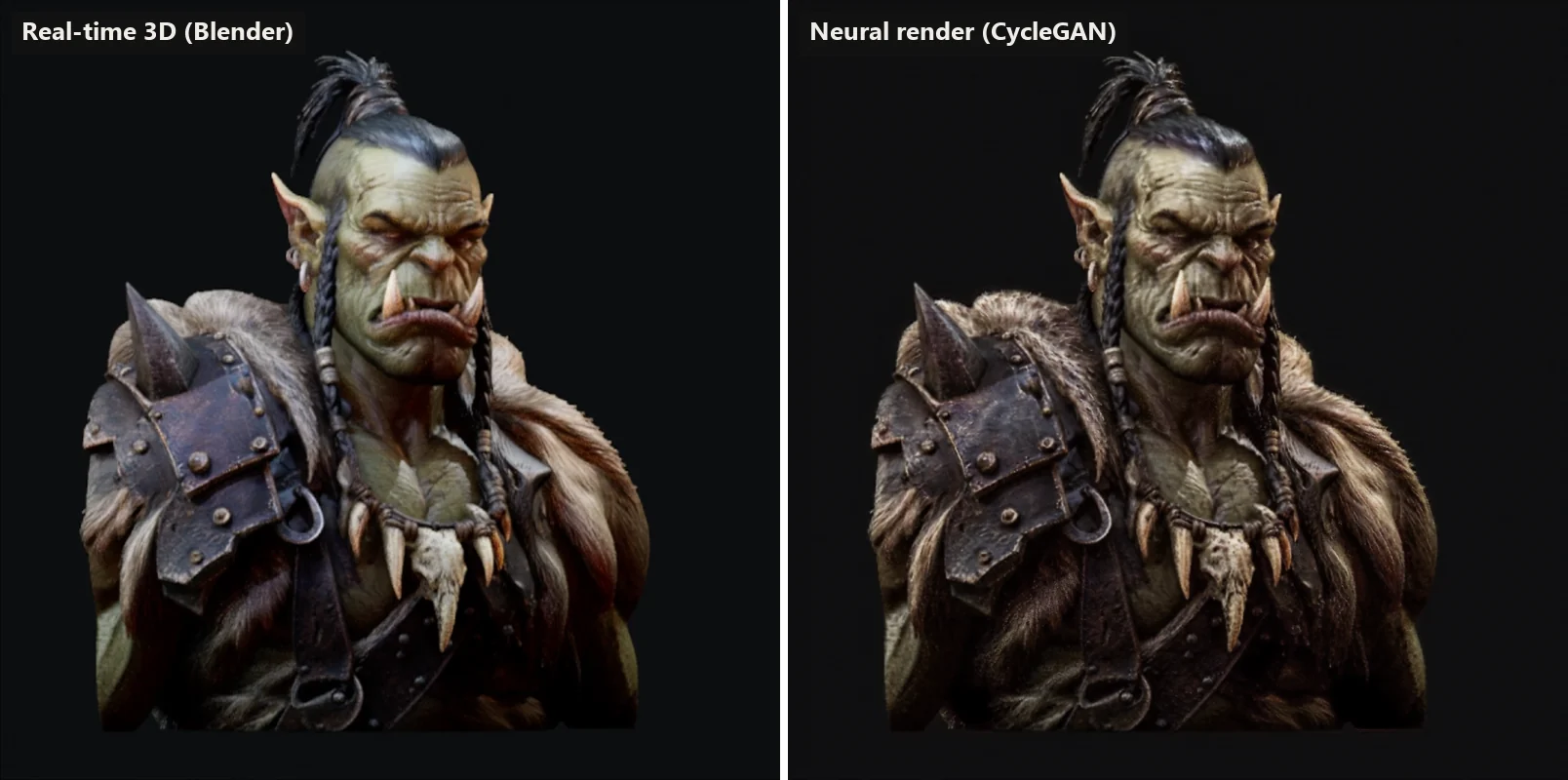
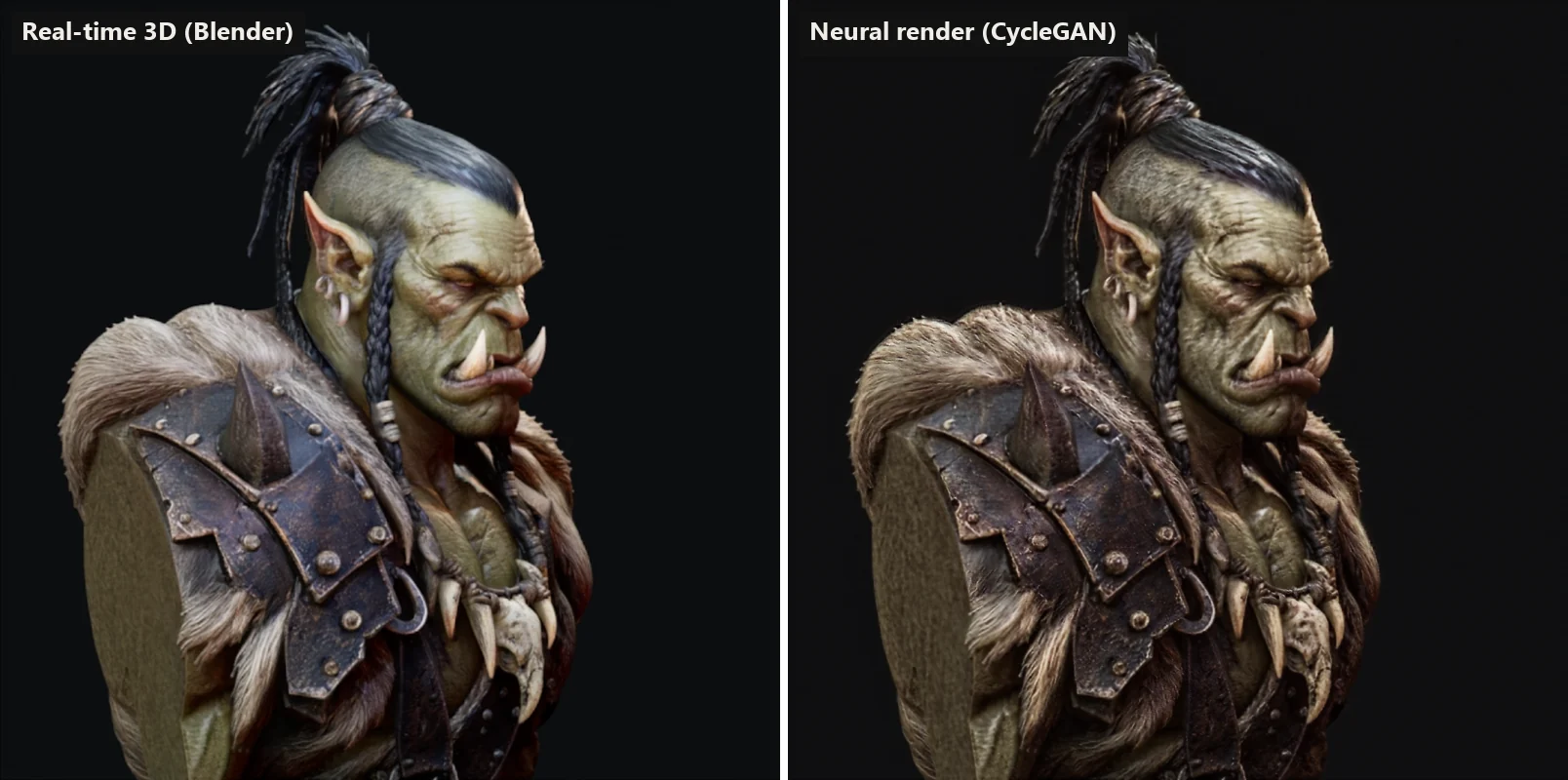
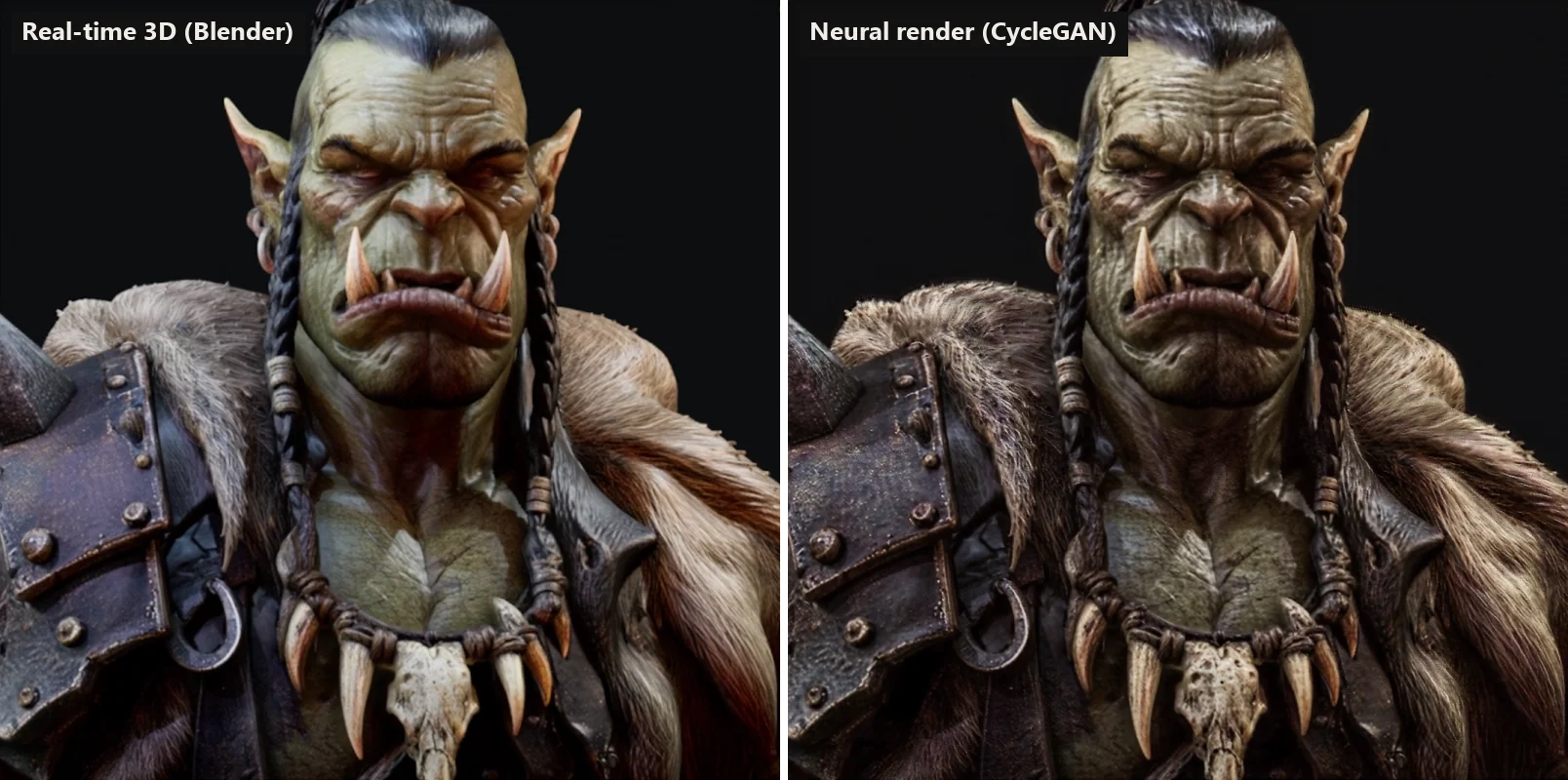
It is not perfect. Each frame is converted on its own, so fine detail like fur can shimmer slightly in motion. The network has learned this one character and would need new examples for a different one. And it inherits the look of the AI images it learned from, flaws included.
Why this matters beyond an orc
The interesting part is not the orc. It is the split of work.
The 3D model controls everything that has to be right: proportions, the camera, consistency from one angle to the next. That is exactly where pure AI image generation fails, and why I still argue for 3D renders over photography and over AI images when the result has to match reality. The neural layer only adds the last stretch of realism, and it does it on top of a cheap real-time render instead of hours of path tracing.
For product visualization, games, configurators and pre-visualization, that combination is where this is heading: fast, controllable 3D underneath, and a learned layer that makes it look shot instead of rendered. This was a small experiment on an old graphics card. The approach scales.
If you are working on 3D visualization or an AI pipeline and want to explore what a layer like this could do for your renders, get in touch.
Frequently asked questions
What is neural rendering?
Neural rendering means using a neural network as part of the rendering process. In this project the 3D scene is rendered normally in real time, and a trained network then repaints every frame so it looks like a photograph instead of a 3D render.
Why use CycleGAN instead of a normal image-to-image model?
CycleGAN can learn from two piles of images that do not match pixel for pixel: 3D renders on one side, realistic images on the other. It learns to translate between them while a cycle check keeps the shapes in place. That fits a project where the realistic images come from AI tools and never line up perfectly with the renders.
Do you need an expensive GPU to train it?
No. Everything in this post was trained on a GeForce GTX 1070 with 8 GB of memory, a graphics card from 2016. The final generator is small, about two million parameters, and trains at around five steps per second on that card.
Does it run in real time?
Not yet. Converting the 1,862 frames of the video took about six minutes on the GTX 1070, roughly 0.2 seconds per frame including reading and saving each image. A newer GPU and an optimised model would get much closer to real time, but this version is an offline pass over a real-time render.
Can this replace traditional 3D rendering?
No, and that is the point. The 3D model controls the shape, the camera and the consistency between angles. The neural layer only adds photographic realism on top. Without the 3D underneath you are back to AI images that change every time you generate them.